Opening Balances
Start mid-year: enter balances as of a go-live date, bring in open invoices and bills, and see any difference that goes to Opening Balance Equity.
Opening balances bring what you already have (cash, receivables, payables, loans, equity) into Lejr as of the day before your first day here.
You enter the balances as of one date, and Lejr posts them as one journal entry. Whatever they don't account for shows in Opening Balance Equity for you to resolve. Lejr never adds a figure to make them balance.
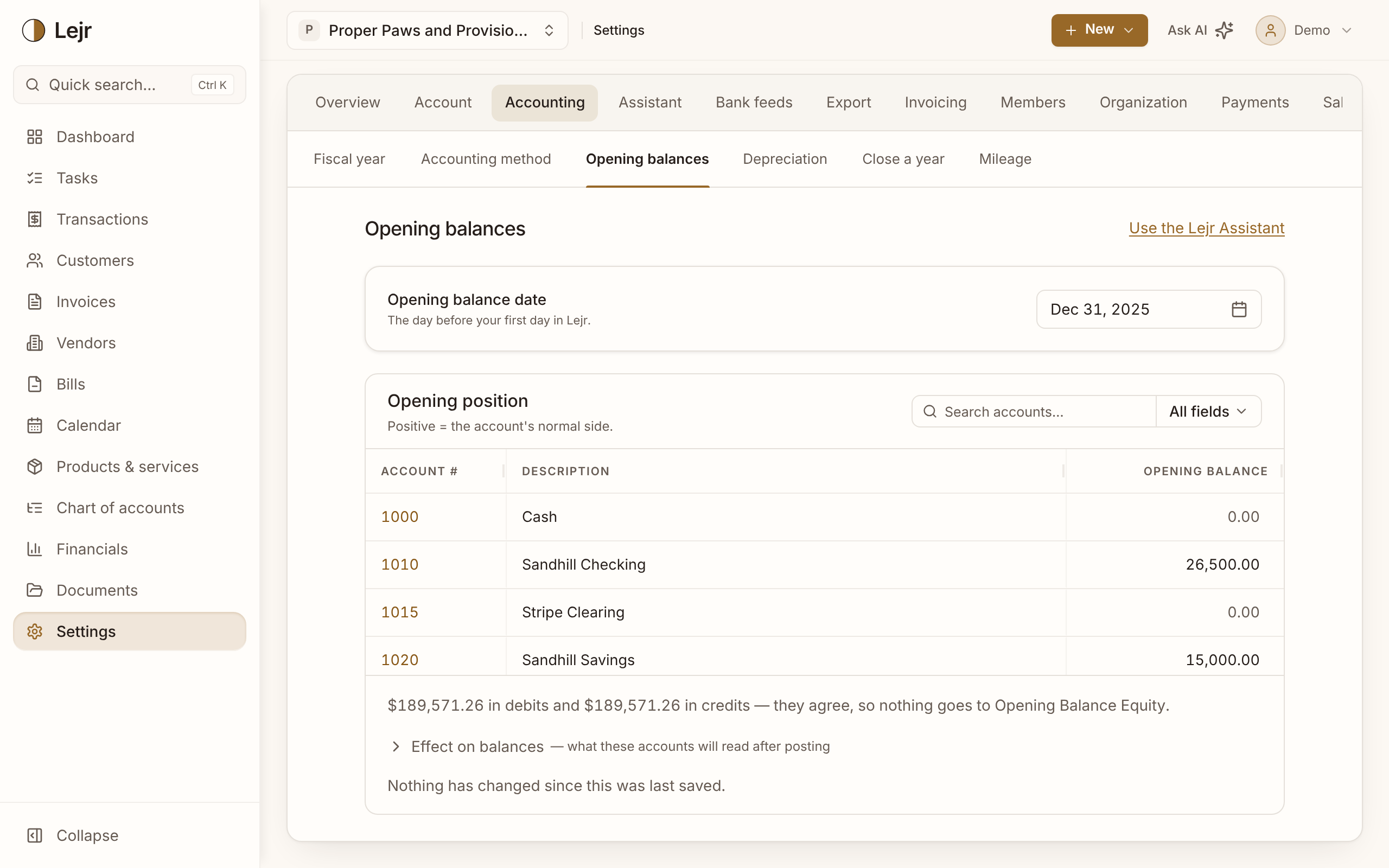
Entering opening balances
- Set the opening balance date
In Settings → Accounting → Opening balances, pick the day before your first day in Lejr: switching on January 1 means balances as of December 31. Your old system's trial balance as of that date is the best source.
- Enter each account's balance
Type the balance beside each account you're carrying over. A positive number is the account's normal side; a blank is zero.
- Itemize receivables and payables
Use Itemize on Accounts Receivable to say which customers owe the balance, and on Accounts Payable for which vendors you owe. Each line becomes an open invoice or bill dated the opening date, which ages and can be paid like any other.
- Post them
Check Effect on balances, then choose Post opening balances. Later edits post as corrections.
Opening Balance Equity
If debits and credits don't agree, the difference goes to Opening Balance Equity, an ordinary equity account on your balance sheet. The page shows how much and which way.
If you entered only assets and liabilities, the amount is the business's net worth carried in, and it belongs in Retained Earnings or Owner's Capital. Post the journal entry opens an entry with Opening Balance Equity filled in and the other account left for you or your accountant to choose.
If you also entered equity, income and expense accounts, you entered a complete trial balance, and its debits and credits should agree. Anything left in Opening Balance Equity is then an error (a wrong or missing figure) to correct on this page, not to move with a journal entry.
Until it's cleared, Clear Opening Balance Equity stays on your task list.
Why itemize receivables and payables
A lump in Accounts Receivable can't be aged, paid or shown on a statement. Itemized, it's an open invoice per customer. Anything you don't assign stays as a lump, and the drawer shows how much.
Itemized invoices and bills are offset to Opening Balance Equity, not revenue or expenses, so last year's sales don't reappear on this year's income statement.
Why imports skip earlier rows
Bank imports and statement uploads skip transactions dated on or before the opening balance date, since your balances already include them. Lejr tells you how many rows it skipped.
Good to know
- Only an owner or admin can set opening balances. Anyone with access can see what's posted.
- Changing the date reverses the opening position on the old date and posts it on the new one.
- Use the Lejr Assistant at the top of the page lets you give the assistant your old trial balance (PDF, spreadsheet or screenshot) and have it enter the figures for your approval.
Common questions
- Do I need a complete trial balance?
- No. Starting with the bank, receivables and payables is fine; the rest shows in Opening Balance Equity until you fill it in. A brand-new business can skip this page.
- Why doesn't Lejr move Opening Balance Equity to Retained Earnings for me?
- Whether it belongs in Retained Earnings or Owner's Capital is your or your accountant's call, and an imbalance shouldn't be moved at all. Lejr shows the amount and opens the entry; you choose the account.
- Can I change a balance after posting?
- Yes. Edit it and save, and Lejr posts only the change. A period closed or locked through the opening date has to be reopened first.