Dispose a Fixed Asset
Sell, scrap or write off an asset. Lejr removes its cost and accumulated depreciation and posts the gain or loss against net book value.
Dispose of an asset when it is sold, scrapped or traded in. Lejr brings depreciation up to the disposal date, removes the asset's cost and accumulated depreciation, records the proceeds, and books the difference as a gain or loss.
If the asset should never have been set up (a cancelled order or a duplicate), unwind it instead.
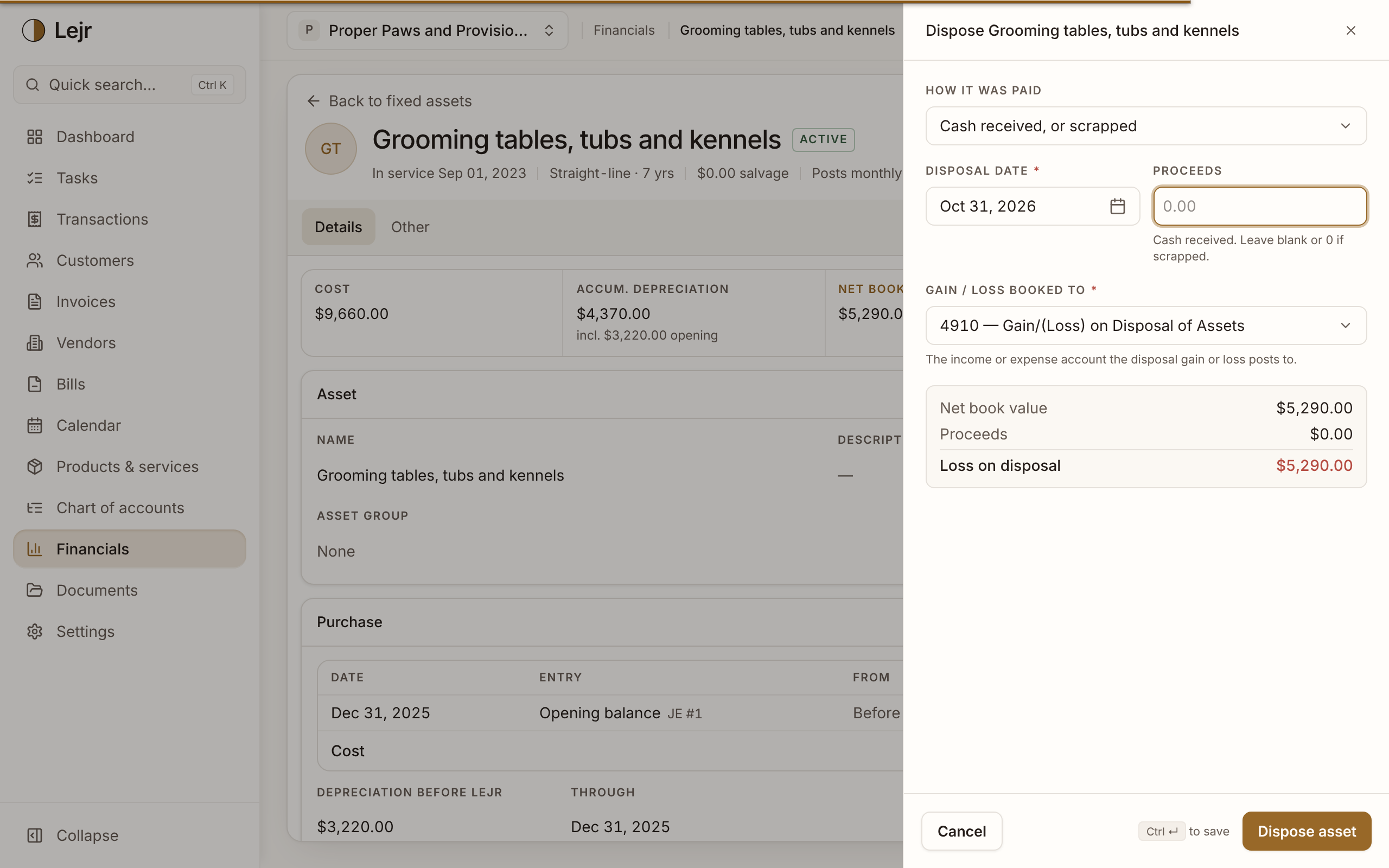
Disposing of an asset
- Open the asset
In Financials → Fixed assets, open the asset and choose Dispose asset from its actions.
- Choose how it was paid
Cash received, or scrapped for a sale or write-off, or Traded in toward a new asset.
- Enter the date and proceeds
The Disposal date can't be before the in-service date. Leave Proceeds blank or 0 if scrapped. For a trade-in, enter the Trade-in allowance.
- Choose the accounts
When there are proceeds, Proceeds go to is the bank, card or receivable account that received them. Gain / loss booked to is the income or expense account for the difference.
- Check the preview and post
The preview shows net book value, proceeds, and the Gain on disposal or Loss on disposal. Choose Dispose asset.
Depreciation to the disposal date
Lejr first brings accumulated depreciation to what the method allows on the disposal date and posts that as a separate entry. The preview then says Includes depreciation to this date.
Under MACRS the convention can reduce it instead. With the half-year convention, an asset disposed of in November keeps half a year's depreciation for that year, and bonus depreciation taken in the same tax year is reversed. The preview then says Includes depreciation taken back.
The disposal entry
One entry on the disposal date credits the asset's cost, debits its accumulated depreciation, debits the proceeds account, and records the difference as a gain (credit) or loss (debit). Gain or loss equals proceeds minus net book value.
The asset is marked Disposed, links to the entry, and the rest of its schedule is cleared.
Trading in
The allowance goes to a Trade-in clearing account, an asset account you can create from the sheet.
Then post the new purchase as a journal entry: debit the new asset for the full price, credit the bank for the cash paid, and credit the clearing account for the allowance. Add the new asset from that entry with Entries in Lejr.
Unwinding
Unwind asset reverses the depreciation Lejr posted for it, each reversal in its own month, and clears the schedule. The purchase entries stay on the asset account, unassigned, so you can link them to another asset or recategorize them. No gain or loss is recorded.
Every month a reversal lands in must be open. A disposed asset can't be unwound.
Good to know
- If the accumulated depreciation account holds depreciation not linked to any asset, Lejr shows the amount and asks before disposing.
- A disposal dated in a locked period is refused.
- The assistant always asks for approval before disposing or unwinding.
- Lejr records the book gain or loss. Tax treatment and depreciation recapture are for your preparer.
Common questions
- Can I skip the catch-up depreciation?
- No. Gain or loss is only correct against book value on the disposal date.